

M.2 Speed Matches Cpu Load !?

dwarfer09

Geek Trainee
Hi,

I have a question regarding my Samsung NVMe SM951 m.2 drive, I have bought it because of the super speeds and made sure my motherboard supports it, I have Asrock x99m Fatal1ty Killer 3.1 PCIe Gen3 x4 M.2 and people getting 1.3GB/s, I can achieve this but ONLY if the CPU is maxed out! Normally it will be between 850 - 950MB/s under low CPU load.

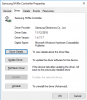
This is the latest driver I can find online
2.png

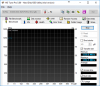
I'm running HD Tune to check the speed of the drive
1.png

Why the heck does the drive only peak performance when CPU is higher?
 
I mean there is a direct correlation between the speed of the drive and the load of the cpu, the higher the CPU load the faster the m.2! (between 850 - 1350MB/s)

Say for instance the cpu is idle the m.2 will peak at 850MB/s, if I convert files and have the cpu load at 50% the drive will increase to 1000MBs, and if I have the CPU load to max the drive peaks to 1350MB/s
 
Might be something to do with SSD load type also. You can easily test this by putting CPU some dummy work, like Prime95 running on small/large amount of threads and see if that shows similar results.
 
I thought maybe it's speed step boosting CPU speed to 3.5GHz from 1.20GHz but no, it's constantly 3.2ghz during the test
 
ive heard it throttles so easily, but the changes are way too fast for it to cool during cpu load. besides I have water cooler and fans dont change so rapidly

It's like a switch, it suddenly peaks for no apparent reason under cpu load so I thought its a power saving thing in the CPU so I disabled C1 state in bios to no effect :(
 
since the drive uses PCI express 3 x4 could it be the PCI pathways slowing down, possibly under power saving, slowing it down??

if this is the case what shall I be checking for, something in bios? - I don't understand c1 states and stuff
 
since the drive uses PCI express 3 x4 could it be the PCI pathways slowing down, possibly under power saving, slowing it down??

if this is the case what shall I be checking for, something in bios? - I don't understand c1 states and stuff

Perhaps Windows power saving options may also help? Hard to say where to look in your BIOS because all BIOS's are different.
 
Perhaps Windows power saving options may also help? Hard to say where to look in your BIOS because all BIOS's are different.

had a thurough look in bios, changed pci slots to gen3, the ASPM was already disabled. i also tried setting multiplier to x37 (which is normal on this cpu) but the thing didnt boot (??)

im out of options
 
Back
Top