DaRuSsIaMaN
Geek Comrade
Okay, what I'm talking about is when u use My Computer or Windows Explorer (well, same thing really), I remember in Win98 u had a thing like an address bar at the top. Just like in browsers it shows the URL, in that bar it had the complete path of the directory that u're currently in. So u could even just type in a directory path and hit enter and instantly be there. They did have this feature in Win98, right? Maybe I'm just dreaming? But I was pretty sure they did ...
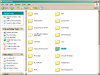
So anyway I can't figure out how to enable this in WinXP. I went into tools > folder options > "view" tab, and there i have the option "display full path in the address bar" ticked. But that doesn't seem to do anything. I just get a strange rectangle thing in the top right corner of my window which says "address" ... And I can't seem to do anything with it. I included a screenshot of this enabled "feature". (This is WinXP home with classic rather than the standard interface)
Help?
So anyway I can't figure out how to enable this in WinXP. I went into tools > folder options > "view" tab, and there i have the option "display full path in the address bar" ticked. But that doesn't seem to do anything. I just get a strange rectangle thing in the top right corner of my window which says "address" ... And I can't seem to do anything with it. I included a screenshot of this enabled "feature". (This is WinXP home with classic rather than the standard interface)
Help?