Monitor has shadows - 3D goggle looking?

Djuice

Geek Trainee
Recently I was given a 21" monitor (EVOKD-2100) that has an irritating problem. Everything on the screen has a red and blue shadow underneath and to the right, like a perfect dropshadow. The blue is very very light and so is the red, but against a black background they are very easy to see. I wouldn't mind ordinarily but it actually makes the text look fuzzy and strains the eyes to look at. I took a picture with my digital camera, and although not the best for obvious reasons, you can still see the red and blue shadow:

MonitorShadow.jpg


I noticed a bunch of controls on the back of the monitor for Red, Blue, Green, Horizontal and Vertical adjustment, but I'm not sure if these will help or even how to adjust them. Here's a picture:

MonitorControls.jpg


Can anyone help with this problem?
 
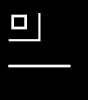
i dont think there is a way to fix it but i have here a simple (and a bit unprfessional) laser allign test

i take it that the monitor is a CRT, it appears as tho the green laser isnt alligned properly, i think its green as you say the blue and red shadow is underneith the text.

to test which laser is out of allignment load the pic below the black and white one, somewhere (either top right or bottom left) of the block with your monitor it should appear a single colour either R, G or B, (it should be green)

the idea with this is that to generate WHITE the monitor has to use R, G and B, if there is a laser out of allignment then somewhere within that box should be solid a colour as the disalligned laser cannot lock onto it to mix with the other 2 colours

which ever colour it shows AT THE TOP OF THE BOX is the colour /laset that needs adjusting

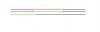
with the second RGB test look at the middle lines, one of them lines should be out of allignment (all lines are lined up straight) if a laser is out of allignment then a particular colour IN THE MIDDLE COLUM will be missalligned (sorry for the smallness of the lines but it has to be 1-pixel height to fully test it)
 

Attachments

  • untitled.JPG
    untitled.JPG
    2.3 KB · Views: 115
  • untitled44.JPG
    untitled44.JPG
    2.8 KB · Views: 205
Back
Top