Our Gateway PC had two drives when we bought it (CD-ROM and CD-RW). After a while, the CD-ROM broke. It still had power and would open/close, but it wasn't listed in My Computer (It had A, C, and E drives, but no D), and the CDs wouldn't auto-run.
So we bought a DVD-ROM to replace the CD-ROM (LiteOn model COHD-16P9SV). I took out the old one, put in this one and plugged in the Power and IDE cords.
When I booted the computer up again, the power works, but it still isn't listed in My Computer, and is the exact same thing as with the old CD-ROM.
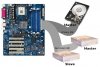
Is there a problem with the IDE Cable? I didn't pay a lot of attention when the computer was open, but it looked to me like there was only one IDE cable connecting to the two drives - first into the CD-RW, and then into the DVD-ROM. Is that possible?
http://www.radioshack.com/product/index.jsp?productId=2102436&cp=&kw=ide&parentPage=search
Would that one work as a replacement? If so, do I just unplug the old one and throw in this new one?
Thanks a lot everybody, and I hope you all had a Merry Christmas.
So we bought a DVD-ROM to replace the CD-ROM (LiteOn model COHD-16P9SV). I took out the old one, put in this one and plugged in the Power and IDE cords.
When I booted the computer up again, the power works, but it still isn't listed in My Computer, and is the exact same thing as with the old CD-ROM.
Is there a problem with the IDE Cable? I didn't pay a lot of attention when the computer was open, but it looked to me like there was only one IDE cable connecting to the two drives - first into the CD-RW, and then into the DVD-ROM. Is that possible?
http://www.radioshack.com/product/index.jsp?productId=2102436&cp=&kw=ide&parentPage=search
Would that one work as a replacement? If so, do I just unplug the old one and throw in this new one?
Thanks a lot everybody, and I hope you all had a Merry Christmas.