


RHochstenbach
Administrator
Grounding and Static Electricity FAQ
One of the most common dangers to computer hardware is caused by static electricity. If your body is loaded with static electricity, it can severely damage the hardware components of your computer when performing maintenance. It is important to ground yourself, so the electricity can flow away from your body. This topic appears to be quite frustrating, so I'll take some time to write this down.
What is Static Electricity?
Static Electricity is caused by the friction of two different non-conductive materials. The friction causes electrons from one object to move to the other object. Because these are non-conductive, the electrons can't flow away from the object. This also happens when you walk on a carpet with your shoes on. But also by the friction of your body and clothes. The shoes isolate you from the ground, and the electrons can't flow to the ground.
What are the dangers of Static Electricity to computer hardware?
When your body has a static charge, it could reach up to 400 Volts or even more! If you would touch an electrical component of your computer, you transfer a high amount of electricity to that component. And as a result, you could damage that component. To prevent this, you need to ground yourself while working on the hardware components of your computer.
I just have to touch the chassis of the computer to ground myself, right?
This is not entirely true. All components of your computer are connected to each other by a wire or line called GND. This line acts as a ground and also as the minus-pole in the electronic circuit. The chassis of the computer and the ground wire of the AC-cable are also connected to that wire. This means that you can ground yourself by holding the chassis or any other wire of your computer that is connected to the grounding of the circuits.
The electricity needs to flow to the ground, so it's only possible to ground yourself to the chassis when the AC plug is connected to the power outlet, as the grounding system of your house lets the electricity flow to the ground. Just touching an unplugged computer chassis will not ground you in any way! That is also the reason why some people feel electric shocks when touching a laptop with just 2 AC pins and no ground.
How can I make sure that my computer connects to the grounding system of my house?
In order for your computer to connect to the grounding system, you'll need ground wires in the AC cable, and a ground connector in your AC wall socket.
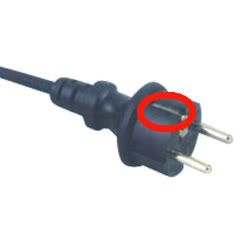
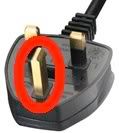
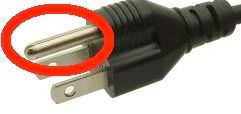
An AC cable with grounding wires usually look like this:
Europe
UK
USA and Canada
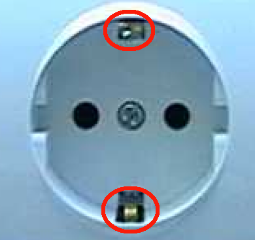
Furthermore you should check if the AC socket has ground leads (especially European people should check this):
Europe
UK
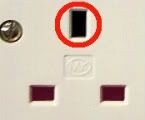
USA and Canada
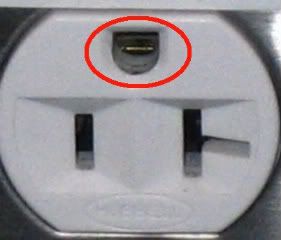
There should be three different color-coded wires connected to the back of the socket (the grounding wire is in most cases coded green/yellow).
I need both hands or I'm not comfortable when the computer is connected to AC power
The best way to ground yourself is to use an ESD wrist strap, as shown in the following image:
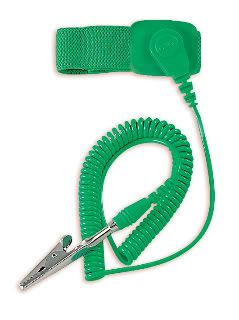
You put the strap around your wrist, and connect the other end to the ground lead of your AC socket (the locations shown in the images above). This way you can use both your hands and you don't need to connect the computer to the AC power. You could also connect it to the chassis of a different grounded computer or to an unpainted part of a radiator.
You can also connect a Wrist Strap to another grounded computer by connecting a USB cable to that computer, and connecting the wrist strap to the outer part of the USB plug at the side that is not plugged in.
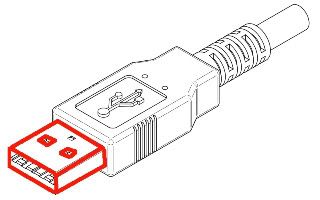
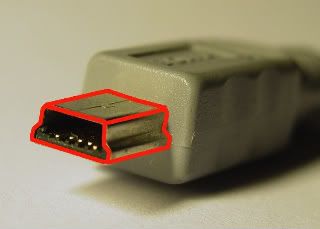
There is also an alternative to the wrist strap that could be useful when you don't have a wrist strap at the moment and you need both hands. Get a long flexible conducting wire (copper preferred), and use your imagination to connect it to a grounded object. Then wrap the other end of the wire around your wrist.
Do I need to have a motherboard seated in order for the case to be grounded?
No, the chassis of the power supply is also grounded, and therefore the chassis of the computer is also grounded (when connected to a grounded AC socket).
I haven't yet seated a power supply in my new computer. Can I just hold the chassis to discharge myself?
No. The electric charge needs to flow to the grounding system of your house. If there is no way to reach this, then the chassis of the computer is not grounded either. In this case, connect an ESD strap to the ground leads of an AC socket, to the chassis of another grounded computer or to an unpainted part of a radiator.
Why don't others say that you need to connect the computer to the AC socket? Are they all wrong?
No not really. If you would touch a conductive material when you have a static charge cause the electrons to flow away from your body. However this can't guarantee that you're 100% static free. It will mostly give the same results as standing in a bucket of water while working on your hardware. When touching a grounded object, all static electricity will leave your body within a second. So an ESD Wrist Strap is always the best solution.
If you have any questions or comments, just leave 'em here :)
One of the most common dangers to computer hardware is caused by static electricity. If your body is loaded with static electricity, it can severely damage the hardware components of your computer when performing maintenance. It is important to ground yourself, so the electricity can flow away from your body. This topic appears to be quite frustrating, so I'll take some time to write this down.
What is Static Electricity?
Static Electricity is caused by the friction of two different non-conductive materials. The friction causes electrons from one object to move to the other object. Because these are non-conductive, the electrons can't flow away from the object. This also happens when you walk on a carpet with your shoes on. But also by the friction of your body and clothes. The shoes isolate you from the ground, and the electrons can't flow to the ground.
What are the dangers of Static Electricity to computer hardware?
When your body has a static charge, it could reach up to 400 Volts or even more! If you would touch an electrical component of your computer, you transfer a high amount of electricity to that component. And as a result, you could damage that component. To prevent this, you need to ground yourself while working on the hardware components of your computer.
I just have to touch the chassis of the computer to ground myself, right?
This is not entirely true. All components of your computer are connected to each other by a wire or line called GND. This line acts as a ground and also as the minus-pole in the electronic circuit. The chassis of the computer and the ground wire of the AC-cable are also connected to that wire. This means that you can ground yourself by holding the chassis or any other wire of your computer that is connected to the grounding of the circuits.
The electricity needs to flow to the ground, so it's only possible to ground yourself to the chassis when the AC plug is connected to the power outlet, as the grounding system of your house lets the electricity flow to the ground. Just touching an unplugged computer chassis will not ground you in any way! That is also the reason why some people feel electric shocks when touching a laptop with just 2 AC pins and no ground.
How can I make sure that my computer connects to the grounding system of my house?
In order for your computer to connect to the grounding system, you'll need ground wires in the AC cable, and a ground connector in your AC wall socket.
An AC cable with grounding wires usually look like this:
Europe
UK
USA and Canada
Furthermore you should check if the AC socket has ground leads (especially European people should check this):
Europe
UK
USA and Canada
There should be three different color-coded wires connected to the back of the socket (the grounding wire is in most cases coded green/yellow).
I need both hands or I'm not comfortable when the computer is connected to AC power
The best way to ground yourself is to use an ESD wrist strap, as shown in the following image:
You put the strap around your wrist, and connect the other end to the ground lead of your AC socket (the locations shown in the images above). This way you can use both your hands and you don't need to connect the computer to the AC power. You could also connect it to the chassis of a different grounded computer or to an unpainted part of a radiator.
You can also connect a Wrist Strap to another grounded computer by connecting a USB cable to that computer, and connecting the wrist strap to the outer part of the USB plug at the side that is not plugged in.
There is also an alternative to the wrist strap that could be useful when you don't have a wrist strap at the moment and you need both hands. Get a long flexible conducting wire (copper preferred), and use your imagination to connect it to a grounded object. Then wrap the other end of the wire around your wrist.
Do I need to have a motherboard seated in order for the case to be grounded?
No, the chassis of the power supply is also grounded, and therefore the chassis of the computer is also grounded (when connected to a grounded AC socket).
I haven't yet seated a power supply in my new computer. Can I just hold the chassis to discharge myself?
No. The electric charge needs to flow to the grounding system of your house. If there is no way to reach this, then the chassis of the computer is not grounded either. In this case, connect an ESD strap to the ground leads of an AC socket, to the chassis of another grounded computer or to an unpainted part of a radiator.
Why don't others say that you need to connect the computer to the AC socket? Are they all wrong?
No not really. If you would touch a conductive material when you have a static charge cause the electrons to flow away from your body. However this can't guarantee that you're 100% static free. It will mostly give the same results as standing in a bucket of water while working on your hardware. When touching a grounded object, all static electricity will leave your body within a second. So an ESD Wrist Strap is always the best solution.
If you have any questions or comments, just leave 'em here :)
