Josh krzyworaczka
Geek Trainee
I bought some Corsair 6GB (3x2GB) DDR3 1600MHz XMS3 Memory for a completely new system back in December. This worked perfectly up until a month or so ago where I noticed my PC is only detecting 4Gb of RAM. There were no error messages or anything. My BIOS only displays 4Gb too, but when using CPU-Z, it says I have 6Gb installed and shows the SPDs for all three slots perfectly. I have swapped my RAM around too and have identified the potentialy corrupt stick.
I have tried Memtest and it also displays all the slots but still only detects 4Gb of RAM. Memtest displayed no errors after 16 passes.
What should I do? Is there anyway to fix this?
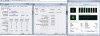
Attached is a screen-shot of CPU-Z and Task Manager. The SPD for all three slots of memory read identical to each other.
Hardware:
Asus Sabertooth X58 Socket 1366 ATX Motherboard
Intel i7 930 2.8GHz Socket 1366 8MB L3
Corsair 6GB (3x2GB) DDR3 1600MHz XMS3 Memory Kit CL9(9-9-9-24) 1.65V
Asus HD 5850 DirectCU 1GB GDDR5 DVI HDMI Display Port Out PCI-E Graphics Card
Antec TruePower New 650W Modular PSU
Thank you for your help.
I have tried Memtest and it also displays all the slots but still only detects 4Gb of RAM. Memtest displayed no errors after 16 passes.
What should I do? Is there anyway to fix this?
Attached is a screen-shot of CPU-Z and Task Manager. The SPD for all three slots of memory read identical to each other.
Hardware:
Asus Sabertooth X58 Socket 1366 ATX Motherboard
Intel i7 930 2.8GHz Socket 1366 8MB L3
Corsair 6GB (3x2GB) DDR3 1600MHz XMS3 Memory Kit CL9(9-9-9-24) 1.65V
Asus HD 5850 DirectCU 1GB GDDR5 DVI HDMI Display Port Out PCI-E Graphics Card
Antec TruePower New 650W Modular PSU
Thank you for your help.