My Audio Ports in the back don't work!

swordzero001

Geek Trainee
Hi, the audio ports in the back don't work because they're disconnected and I don't know how to connect the there's a picture to se if you can help me.
My PC: AMD Athlon 64 X2, Asus M2N-MX SE Plus
(http://img353.imageshack.us/img353/4701/mainboardhz2.jpg)
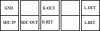
The audio cables disconnected are: R-Out y R-Ret (On the same), L-Out y L-Ret (On the same), MIC-IN, MIC-POWER y GND.
Any help would be very much appreciated.
 
You should connect them to the green block at the lower left corner of the motherboard.

asusmobo.jpg


Now connect your cables to these connectors:

R-Out > Line Out_R
L-Out > Line Out_L
MIC-POWER > Mic2_R
MIC-IN > MIC2_L
To connect the other side of each plug, use the pin that is on the opposite of the other connector.
 
Thanks, but where do I put every Pin?
I have these R-Out y R-Ret (On the same), L-Out y L-Ret (On the same), MIC-IN, MIC-POWER y GND, but you put MIC2-L, MIC2-R, etc.
 
RHochstenbach said:
R-Out > Line Out_R
L-Out > Line Out_L
MIC-POWER > Mic2_R
MIC-IN > MIC2_L
To connect the other side of each plug, use the pin that is on the opposite of the other connector.
I'm sorry, I was editing my post while you where replying :)

Does every connector have 2 wires?
 
Thanks Man gonna do that as soon as I turn off my PC (in 10 minutes.)

EDIT:Only R-Out y R-Ret (On the same), L-Out y L-Ret (On the same)
 
It didn't work, attached is a image explaining how I connected it (I may be wrong about the OUT/RET but I tried both ways)
 

Attachments

  • Dibujo.GIF
    Dibujo.GIF
    3.2 KB · Views: 445
It didn't work, attached is a image explaining how I connected it (I may be wrong about the OUT/RET but I tried both ways)
The OUT and RET should be plugged in the other direction. But try to connect the R-RET with the NC between Line Out R and Line Out L.
 
Back
Top